
Middleware and Services
Descriptive Part
This “Grand Domaine” was separated into four different courses: Service Oriented Architecture, Middleware, Software Engineering and Cloud and Edge Computing.
-
For SOA, the goal was to get an introduction to service-oriented web development through an online course and two lab projects where we had to use the concepts learned along the way.
-
For Middleware, the format was a bit different. While the course was also online, the practical work was much more guided and took the form of standard “Travaux Pratiques” where we experienced the different concepts: oneM2M, MQTT, ACME or node-red.
-
For Cloud and Edge Computing the goal was to understand the basics of the different cloud computing models and the basis of edge computing. The course was focused on Open Stack and Virtualization.
-
The Software Engineering part was done through the course of the innovative project where we adopted a Agile methodology and the Service Oriented Architecture project labs where we had to implement a CI/CD pipeline for the application we where developping.
Technical Part
Service Architecture
Report on the first project detailing technical choices and presenting results: Lab Report: Volunteering Application
Report on the second project detailing technical choices and presenting results: Lab Report: Volunteering Application
Prior to this course, I had no background in Service Architecture or understanding of what it means. The main concepts like services and microservices were relatively easy to grasp, but the most challenging part of this course was using the Java in the different practical lab we followed.
Software Engineering
I wrote an entire report on Software Engineering with a focus on DevOps, available here: Automation and DevOps in the Space Industry: Focus on GitLab-CI
Problem Statement
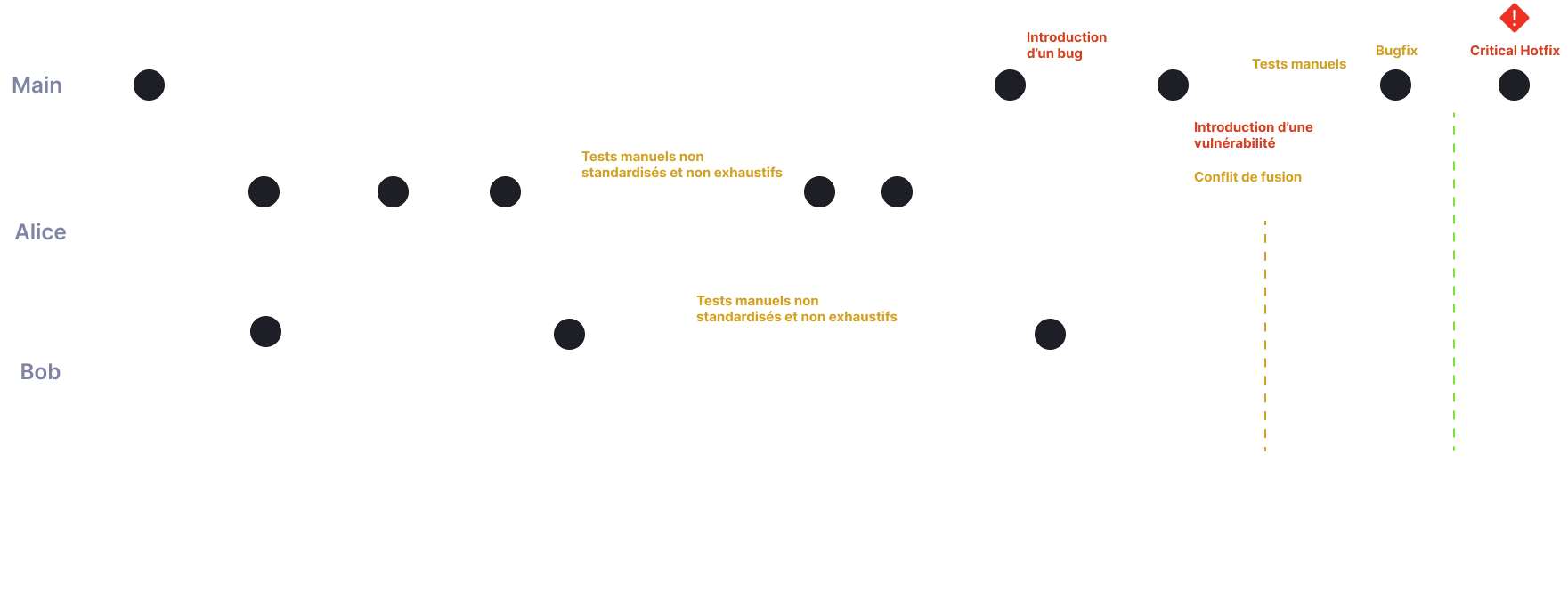
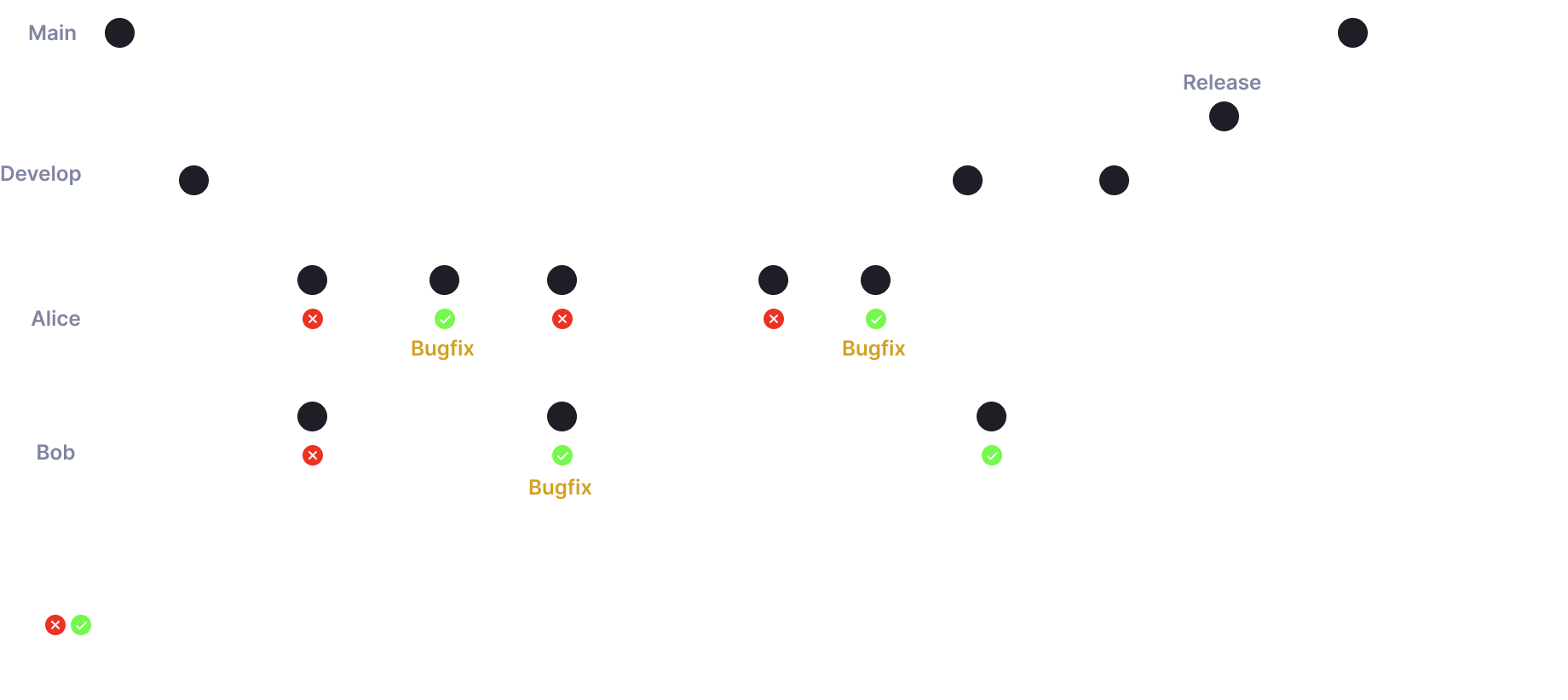
Solution: Continous Integration
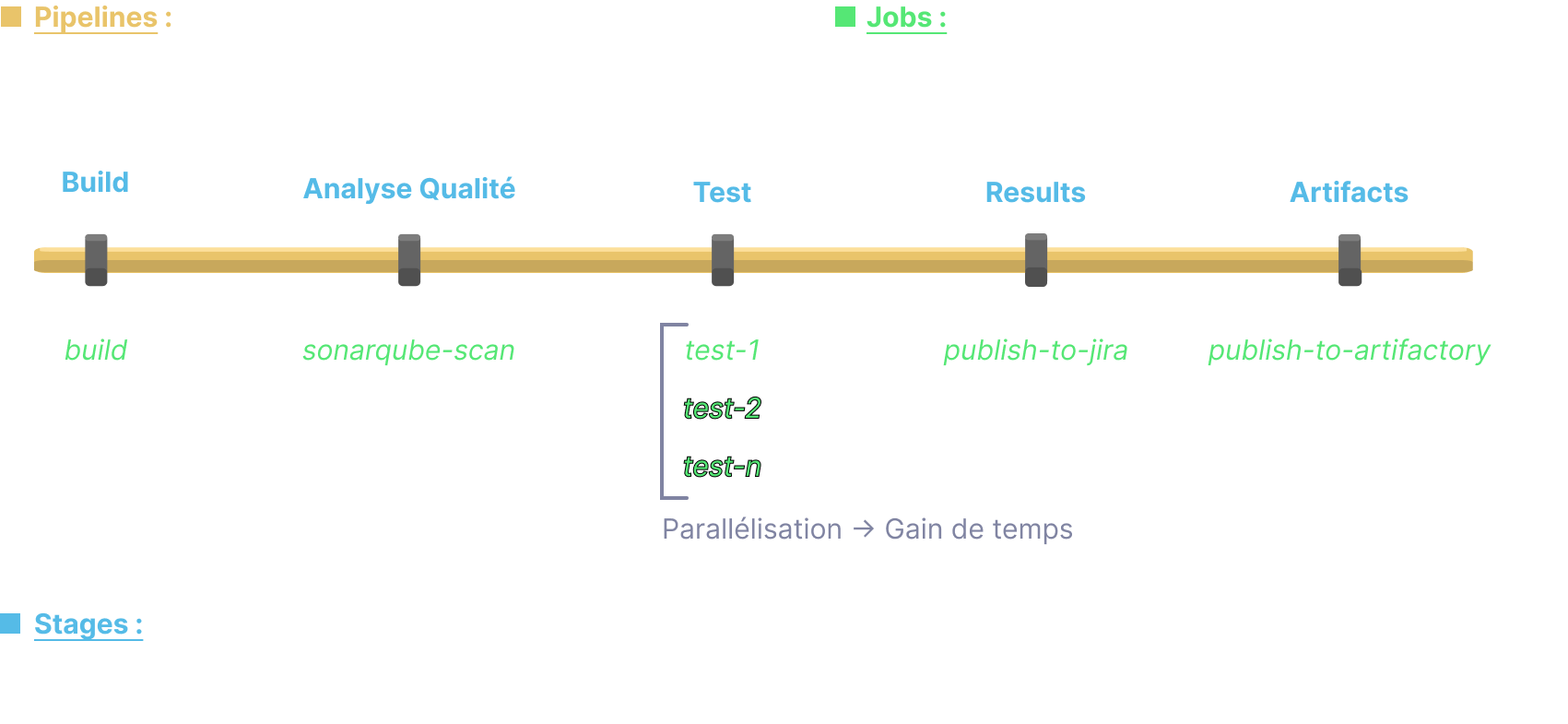
GitLab-CI Philosophy
The following principles are the same on all CI platforms. In the Service Architecture lab we used GitHub Actions.
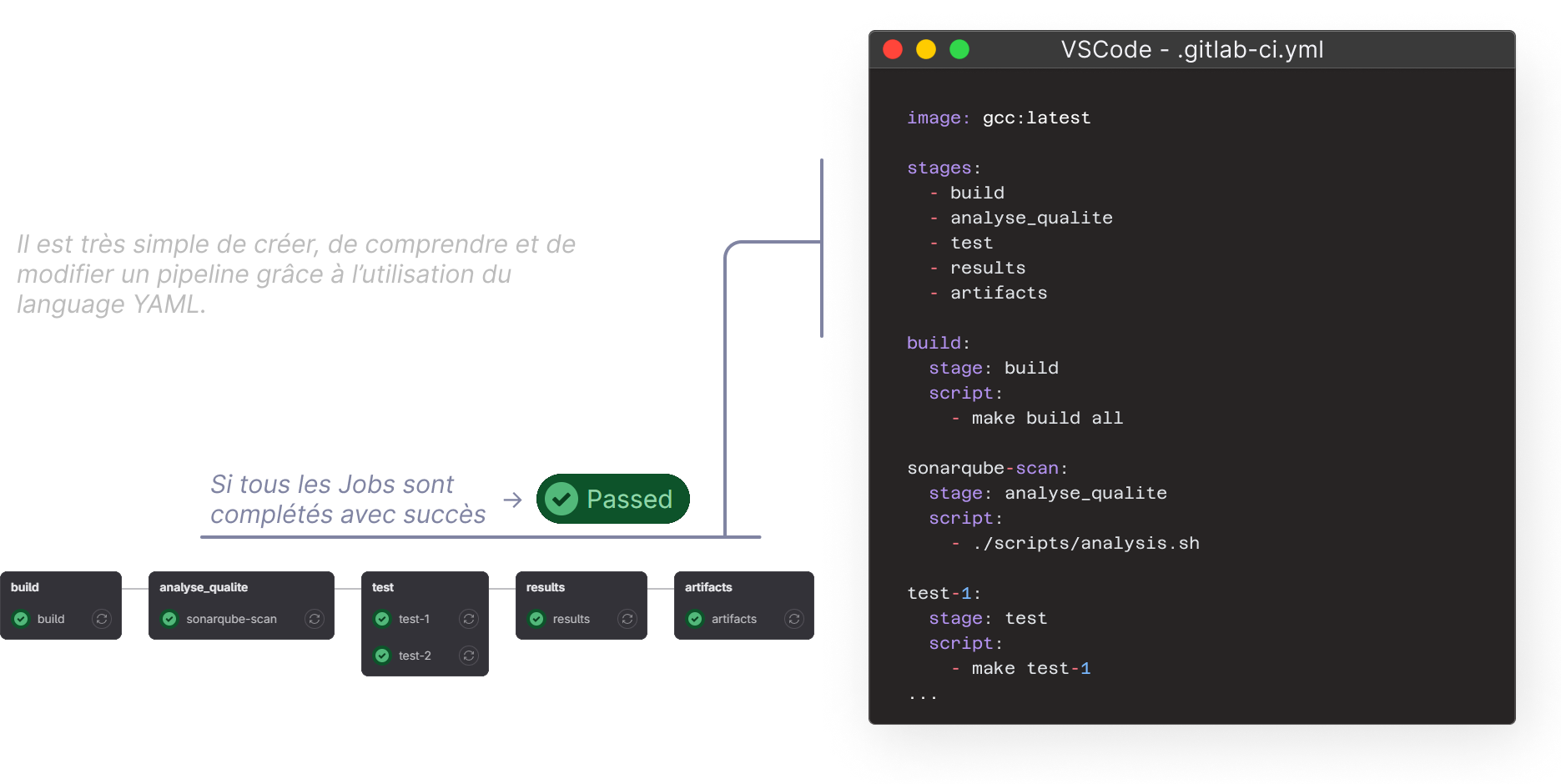
Configuration as code: .gitlab-ci.yml
Notes on Software Engineering Practices at CNES
Preamble
Since the early days of computing, the industry has always worked to improve its processes to meet growing demands. Over time, different methods have been used, and recently, DevOps has become popular. DevOps is an approach that aims to speed up software delivery and make it more reliable by using practices like continuous integration, automated testing, and quick feedback. While DevOps is widely used in the software industry, its use in embedded software, especially for the space industry, is still limited because this type of development comes with unique challenges that need special methods.
Even so, using DevOps in this area offers big benefits in efficiency, quality, and reliability for embedded software. By encouraging teamwork between development and operations teams, DevOps enables continuous integration and nightly regression testing, which helps catch errors early and speeds up delivery. It also promotes good practices like centralized documentation and code traceability. In the LV service, DevOps is already being used in several real projects: MMX, YODA, and SWARM. This presentation looks at the growing importance of DevOps in the space industry and its potential to improve the development of flight software.
Principle
 {: .center}
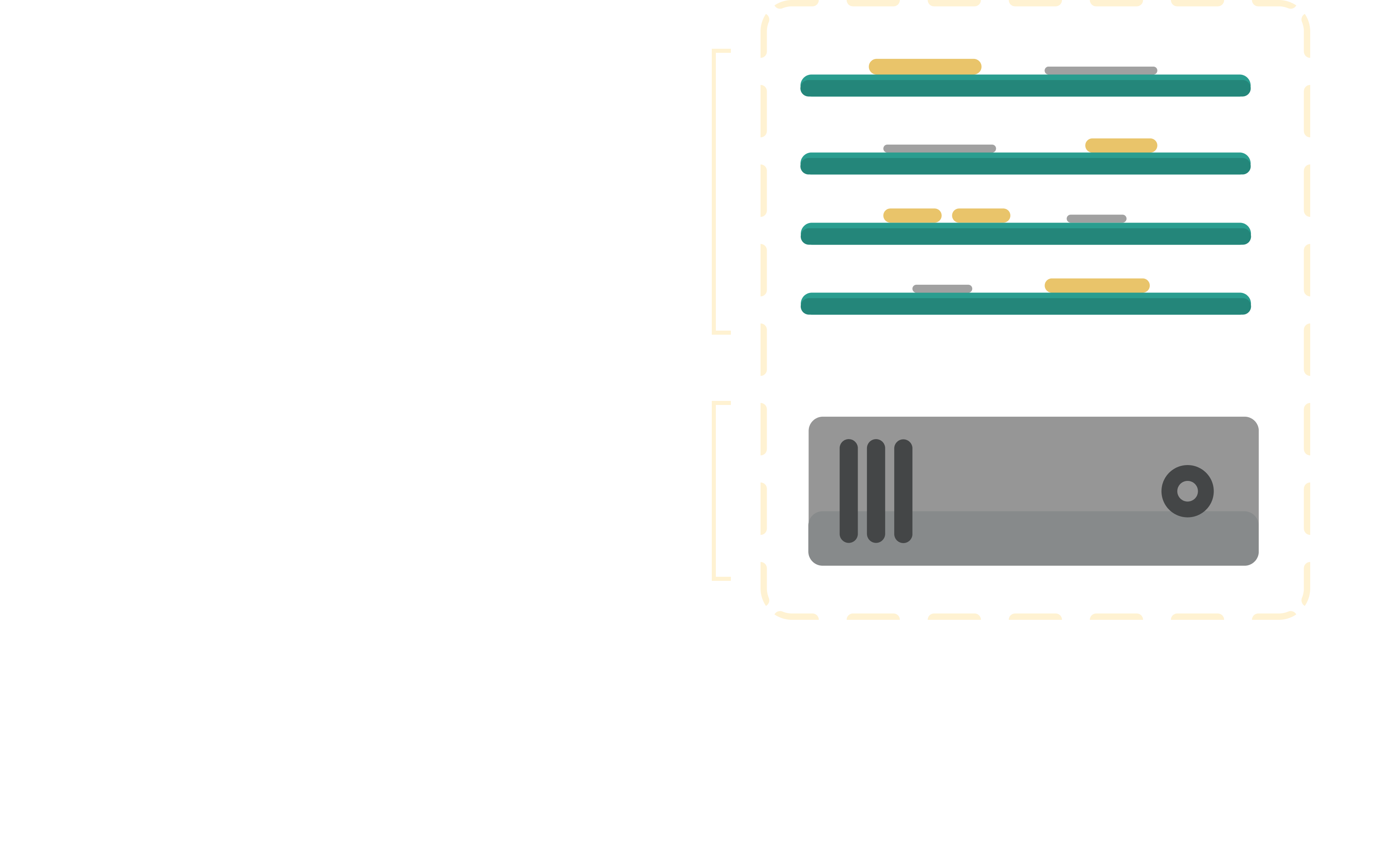
Development Boards Server
Using a development board server offers many benefits, especially for testing. With this server, boards are centrally available to the whole team, which helps reduce costs and make better use of resources. Additionally, the server integrates smoothly with Jenkins, making it easier to automate tests and manage the development pipeline. This setup provides an efficient approach to embedded software development by ensuring the necessary boards are always available and seamlessly integrated into testing and deployment processes.
 {: .center}
Nota Bene
This portfolio uses a Continuous Integration and Continuous Deployment (CI/CD) approach. In fact everytime I edit and push modifications, a GitHub Actions script is executed to automatically deploy the application online.

Middleware
Understanding MQTT
MQTT basics
 {: .center}
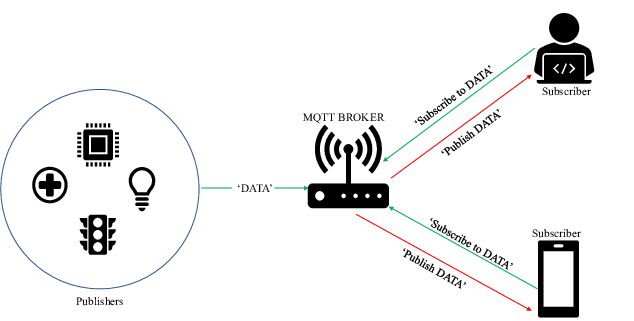
MQTT (Message Queuing Telemetry Transport) is a communication protocol specifically designed to connect devices in an IoT system. MQTT uses a straightforward publish/subscribe architecture.
For example, a temperature sensor sends its data to an MQTT broker to be published under a temperature topic. End users (other devices) can then subscribe to this specific topic and receive the temperature data.
MQTT is built on top of the TCP/IP layer ensuring reliable data delivery (from TCP Ack/Nack) while using minimal bandwidth: ideal for constrained IoT systems. In addition, communications are secured using the SSL/TLS standard.
In a nutshell MQTT is perfect for smart home or industrial monitoring applications.
Why use MQTT ?
MQTT is widely adopted in IoT because of its lightweightness, reliability and flexibility.
In the MQTT labs we experimented with MQTT on a ESP8266, the goal was to simulate a smart home:
- A button publishes a message when pressed (home/light/button)
- A light sensor publishes brightness levels (home/light/luminosity)
- A system subscribes to these topics and decides when to turn lights on or off (home/light/command)
Understanding oneM2M Principles
OneM2M is a standard for the Internet of Things and machine-to-machine (M2M) systems. It provides a common platform that ensures different IoT devices and services can work together no matter who made them. The oneM2M specifications define a logical architecture that includes components like servers, devices, and applications to make developing, deploying, and managing IoT systems easier.
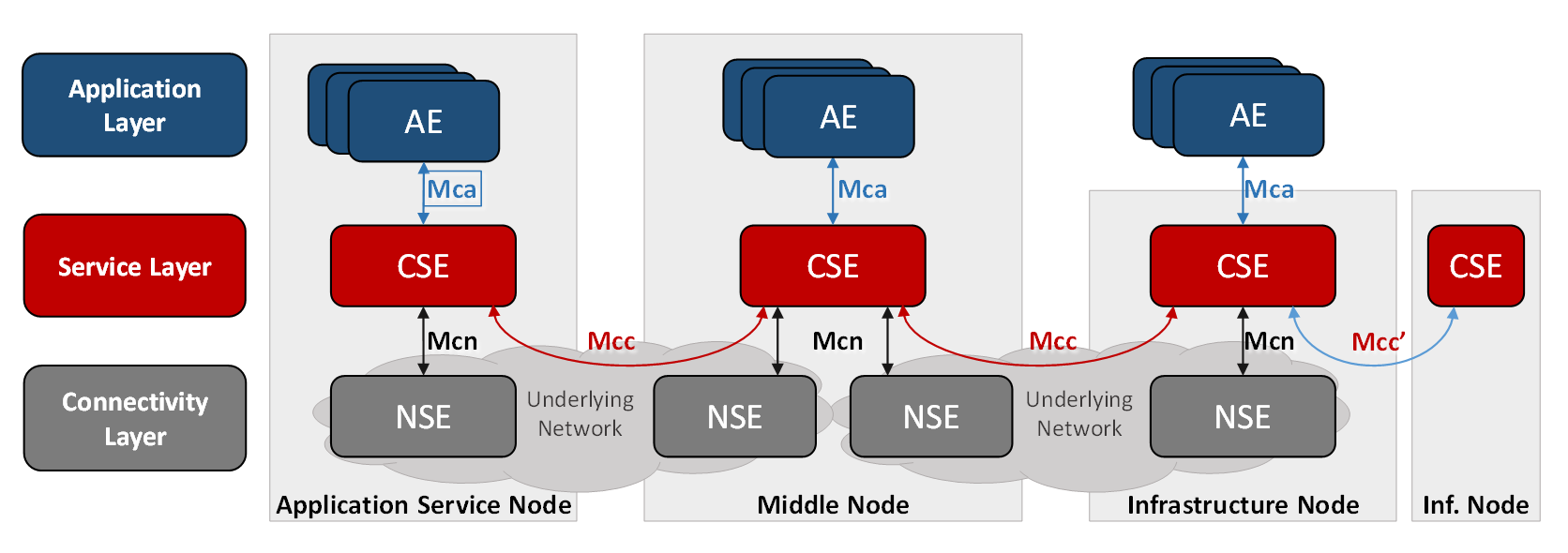 Image: oneM2M Architecture (Source)
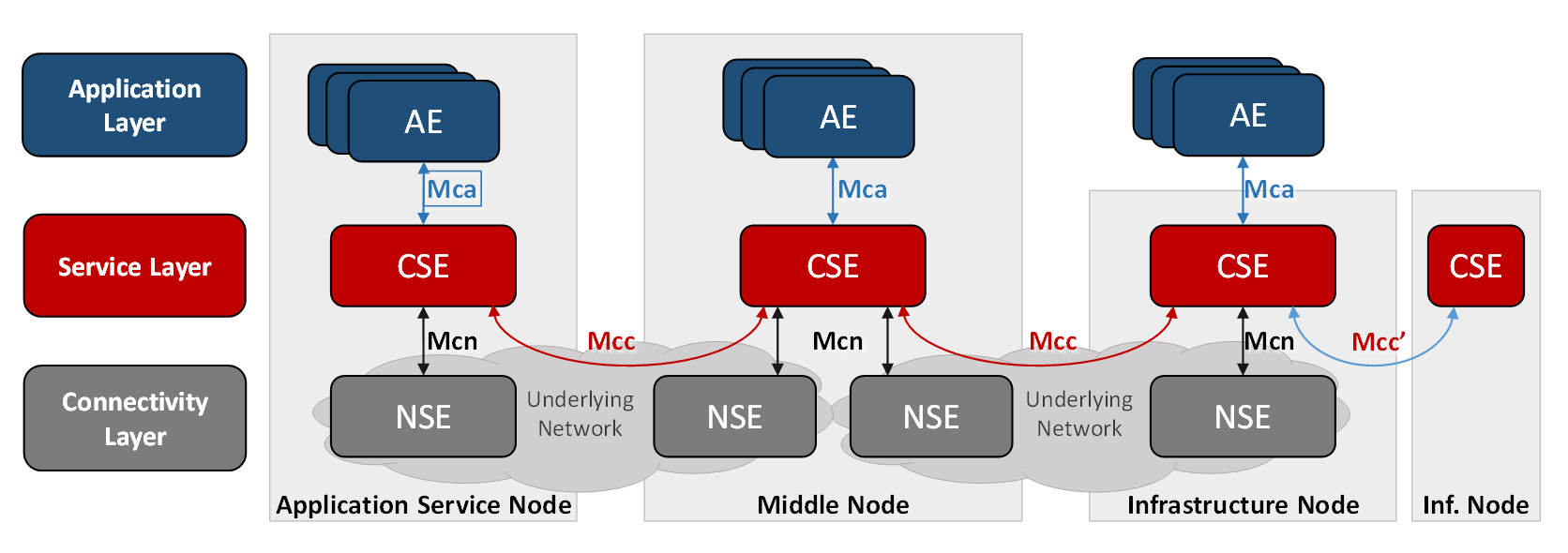
“For an application developer, oneM2M based technology appears like an operating system […]. Hence the IoT Service Layer specified by oneM2M can be seen in a similar way as a mobile operating systems within the smart phone eco system.” From oneM2M Wiki
CSE (Common Services Entity)
The CSE is the central component of the oneM2M architecture, it eases all kinds of information exchange between connected devices (like sensors), applications, and servers.
CSE can be deployed on different types of nodes:
- Infrastructure Node (IN-CSE): A central instance, usually hosted in the cloud.
- Middle Node (MN-CSE): An intermediate instance that connects local devices to the cloud.
- Application Node (AE-CSE): A local instance on a device or application.
ACME
In the practical labs we used ACME which is an open-source implementation of a CSE. It allows creating and managing oneM2M resources through RESTful APIs.
Cloud and Edge Computing
What is Cloud Computing?
In a nutshell, cloud computing delivers various services over the Internet: storage, processing power, applications… Instead of owning and maintaining physical servers, data centers etc. users can access all these ressources on demand from services providers.
It can provide the following advantages:
- Scalability: Easily scale resources up or down based on demand.
- Cost Efficiency: Pay only for the resources you use.
- Accessibility: Access services from anywhere with an internet connection.
- Maintenance: The cloud provider handles maintenance.
We can categorize Cloud Computing into three main models:
- Infrastructure as a Service (IaaS): Provides virtualized computing resources over the internet (AWS, Microsoft Azure)
- Platform as a Service (PaaS): Offers hardware and software tools over the internet. (Google App Engine)
- Software as a Service (SaaS): Delivers software applications over the internet on a subscription basis (Google Workspace)
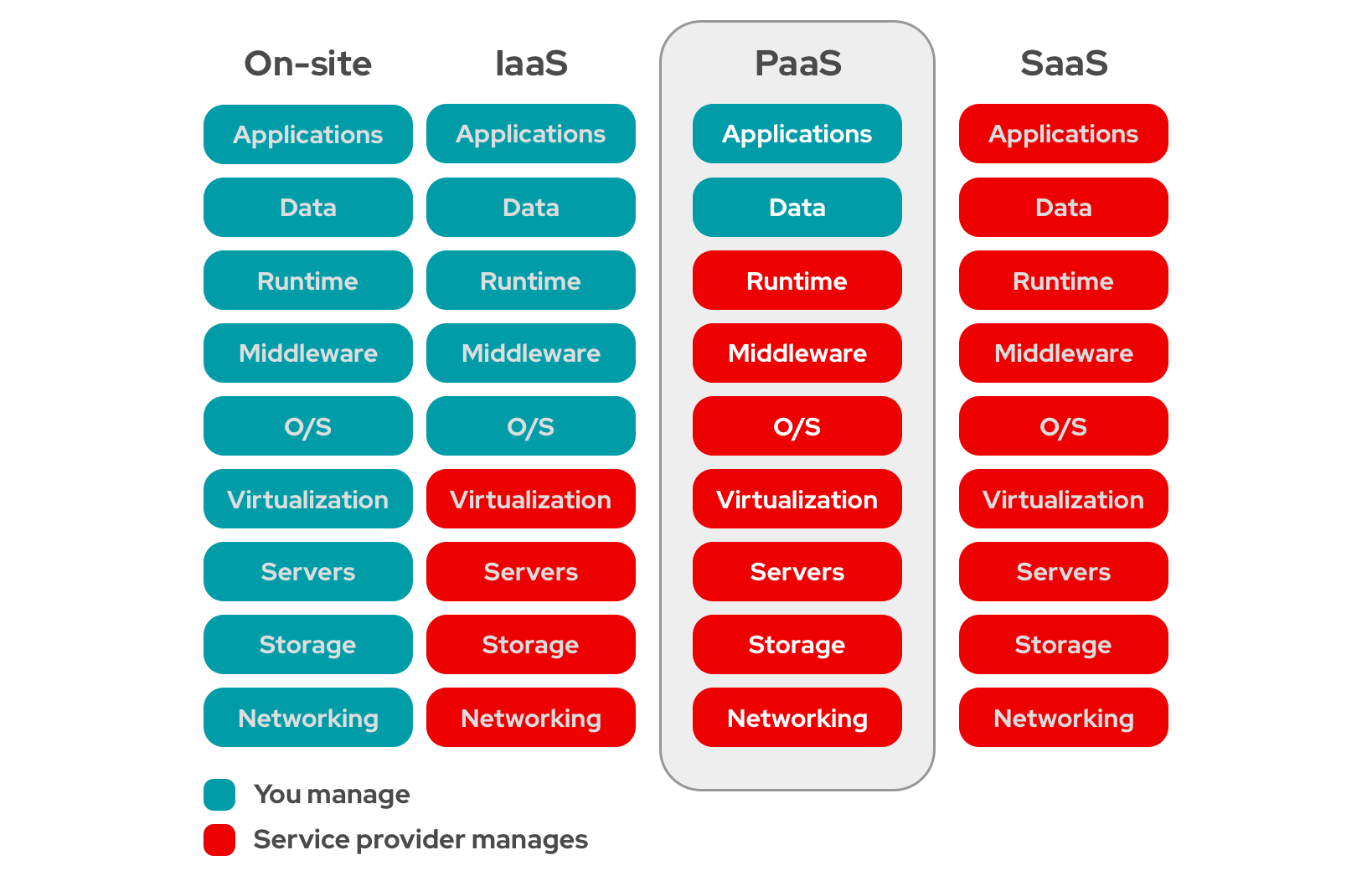 Image: Cloud Computing Models (Credit: RedHat)
Cloud Computing heavily relies on virtualization. In the following parts we will explore the differences between virtual machines and containers and compare various container types.
Differences between virtual machines and containers
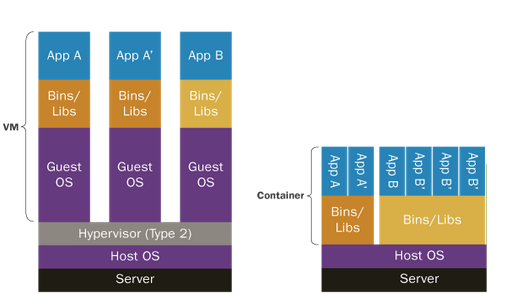
The main difference between virtual machines and containers lies in their architecture and resource utilization.
-
On the left a type 2 Hypervisor is used to create and manage multiple Virtual Machines on a host operating system (hence type 2, type 1: bare-metal hypervisor). Each VMs operate indepoendently with its own guest operating system and applications. Qemu or VVirtual Box are Type 2 hypervisors.
-
On the right, containers are used instead of VMs. Containers share the host OS kernel but run isolated environments with their own libraries and dependencies. This makes containers lightweight and efficient, as they do not require a separate OS for each instance. Containers are ideal for deploying applications consistently across different environments while using fewer resources compared to VMs.
Difference Between Type 1 and Type 2 hypervisors
- Type 1 Hypervisors: Directly operate on hardware (E.g., KVM).
- Type 2 Hypervisors: Operate as software on existing OS (E.g., VirtualBox).
Comparison of Container Types
| Container Provider | Application Isolation and Resources | Containerization Level | Tooling |
|---|---|---|---|
| Docker | Application Container. Strong isolation with cgroups and namespaces. Granular resource limits. Less ideal for multi-tenancy in shared environments. | Application-level containerization | Lot of ways to deal with Docker: Docker CLI, Docker API, Docker Compose. Strong CI/CD integration, widely used. Rootful. |
| Podman | Strong isolation (like Docker). Better for multi-tenancy with rootless containers (doesn’t require daemon). Supports cgroups and namespaces. | Application-level containerization | Docker-compatible CLI. No daemon, rootless mode |
| LXC/LXD | OS-level isolation (System Container). Suitable for multi-tenancy (offers good resource segregation). | OS-level containerization (lightweight VMs) | REST API. Not as integrated with CI/CD pipelines as Docker and Podman. |
| Rocket (rkt) | Strong security (isolates containers with systemd-nspawn) | Application-level containerization | API support, systemd integration |
| OpenVZ | Excellent for multi-tenancy (up to 20 customer networks). Provides strong isolation and resource management with low overhead. Shares a single kernel but offers isolated user spaces. | OS-level containerization (containerized VMs) | Lacks Docker-like API or CI/CD integration but is useful in web hosting environments. Integrated with Proxmox for UI. |
| containerd | Strong isolation. | Application-level containerization | API-driven, integrates well with Kubernetes. |
| systemd-nspawn | Light-weight namespace container. Offers good isolation using systemd. Suitable for trusted multi-tenancy. Can isolate resources but heavy configuration. | OS-level containerization (lightweight VMs) | Integrated with systemd, provides simple container management but lacks CI/CD capabilities. |
Open Stack
In order to better understand Cloud Computing principles, we experienced different scenarios using OpenStack. We created and configured virtual machines (VMs) using the OpenStack dashboard, setting up both private and public networks to ensure connectivity. This involved creating a router to bridge the networks and configuring port forwarding and ICMP rules for SSH and ping capabilities.
We deployed a web-based 2-tier Calculator application using Node.js microservices, with each microservice running on a separate VM. The microservice application architecture is described as follows:
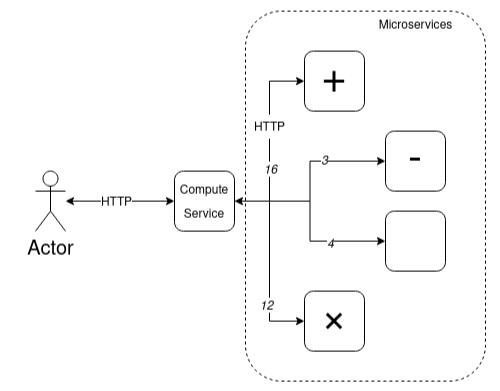 {: .center}
Image: Calculator using Microservices Architecure
{: .center}
Image: Calculator using Microservices Architecure
 Image: Open Stack Dashboard View of the Different VMs for the Calculator Application
I really liked this part of the lab as it was interesting to see a simplified version of how all applications on the web work.
Testing the Calculator
user@tutorial-vm:~$ curl -d "(5+6)*2" -X POST http://10.2.2.103:80
result = 22
Behind the Scene
# Multiply Service
user@multiply-vm:~/Documents$ node MulService.js
Listening on port: 50003

# Division Service
user@div-vm:~/Documents$ node DivService.js
Listening on port: 50004

# Subtraction Service
user@subtract-vm:~/Documents$ nano launch.sh

CalculatorService.js   MulService.js   SumService.js
DivService.js          SubService.js

user@subtract-vm:~/Documents$ node SubService.js
Listening on port: 50002

# Addition Service
user@add-vm:~/Documents$ node SumService.js
Listening on port: 50001

New request:
A = 2
B = 3
A + B = 5

New request:
A = 2
B = 3
A + B = 5

# Network Monitoring
RX packets 52  bytes 4364 (4.3 KB)
RX errors 0  dropped 0  overruns 0  frame 0
TX packets 52  bytes 4364 (4.3 KB)
TX errors 0  dropped 0  overruns 0  carrier 0  collisions 0
What is Edge Computing?
https://www.redhat.com/en/products/edge/hatville
Whereas cloud computing processes data in a centralized manner (data centers) edge computing allows computation and data storage closer to the location where it is needed (hence edge) avoiding unnecessary communications and improving response time. If it can be done on site why can we do it ?
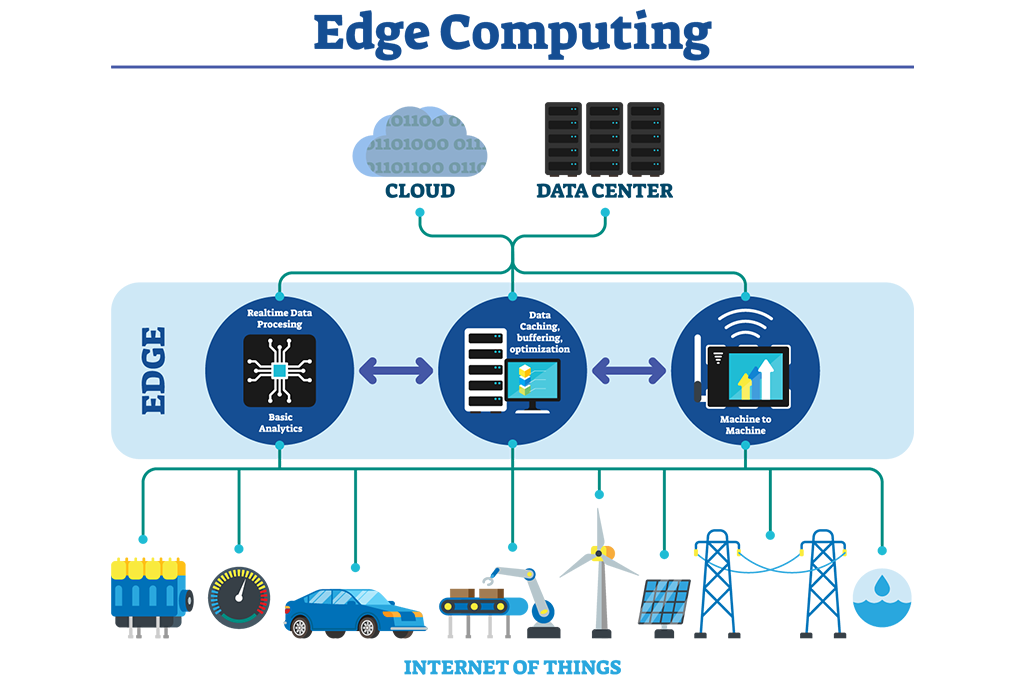 Image: Edge Computing Architecture (Credit)
Edge Computing compared to Cloud Computing:
- Latency: Edge Computing reduces latency by processing data locally.
- Bandwidth: Saves bandwidth.
- Reliability: Reducing dependency on central servers.
- Security: We keep sensitive data on site.
Kubernetes
In the practical lab we experimented with Edge Computing with the help of Kubernetes (or k8s). K8S is an open source orchestration tool that automates the deployment/scaling/management of containerized applications.
Analytical Part
Cloud and Edge Computing
I was already familiar with virtualization and hypervisor as I already worked with theses technologies. At CNES we extensively use Docker to deploy CI pipelines.
I worked a lot with hypervisors and particularly bare-metal hypervisors at FentISS (I did my abroad experience here in Valencia, Spain) where I worked with XtratuM: a space qualified bare-metal hypervisor.
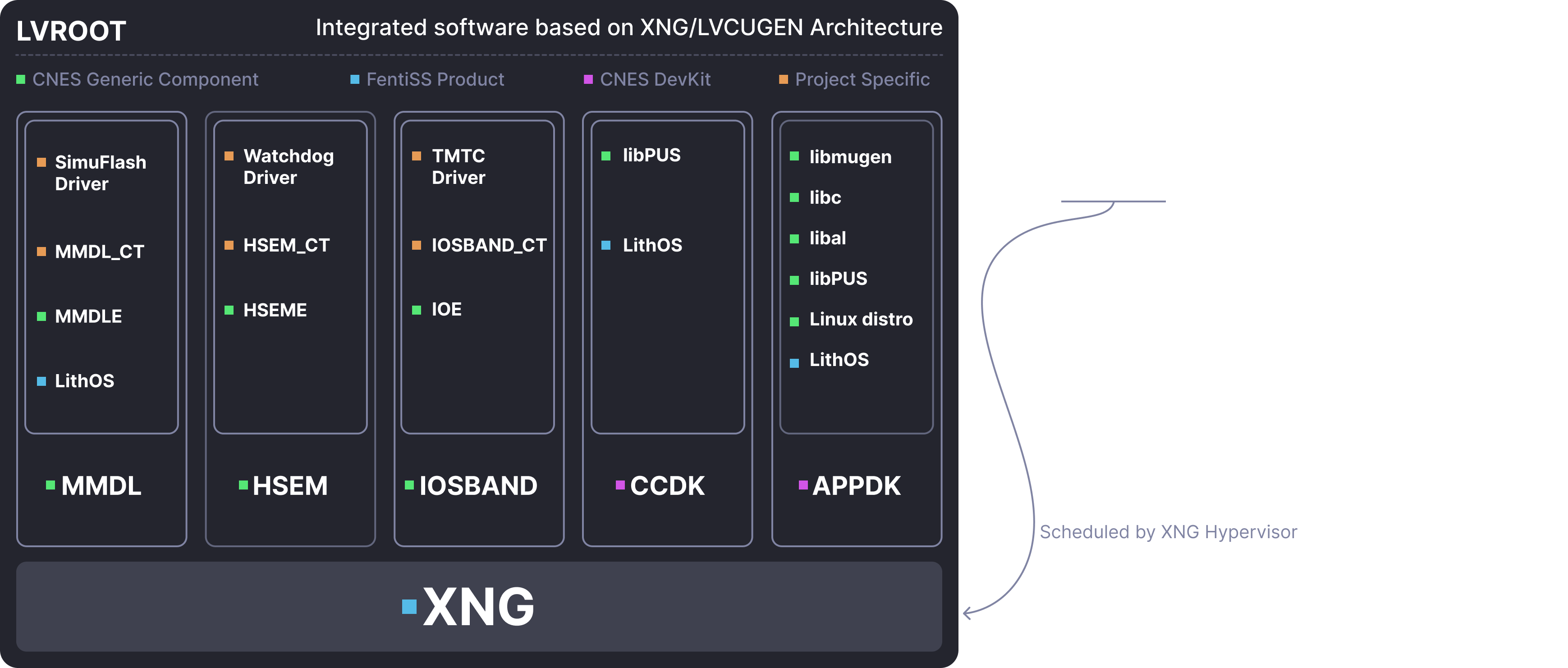 Image: XNG (XtratuM Next Gen) is Used Extensively at CNES fo Flight Software
On the other hand I was not particularly familiar with the Cloud/Open Stack part. This was a enriching experience but the last lab on Kubernetes was too short to be completed, I would have liked to learn more on K8S because a theses led at CNES is specifically oriented on this subject. The goal is to achieve decentralized computing on satelites networks using KLubernetes as a base line.
Service Architecture
Through this course, I significantly improved my Java skills, which was a challenging experience. I also gained a better understanding of APIs, particularly REST APIs, which are very (very) useful in various situations. In addition, I now have a clearer view in how modern web services works, which is good to know as I enjoy learning how things work behind the scenes. Overall, while I do not want to continue in web development, I found this course interesting for my personal general knowledge.
Middleware
The concepts we learned were very useful, before this course, I had no knowledge of MQTT. We ended up using it in our innovative project (to handle communication between the gateway and the server).
Software Engineering
During my apprenticeship at CNES in the Flight Software department, I’ve gained a lot of experience and skills in software engineering as I’ve worked on implementing CI/CD DevOps chains using GitLab CI for flight software components, so I was already quite familiar with concepts like DevOps, CI/CD, and agile practices. Nonetheless, I recognize the utility of this course for other students!
Skills Matrix
| Skill Area | Level | Evaluation Method |
|---|---|---|
| Service Oriented Architecture | AE | Evaluation method |
| Know how to define a Service Oriented Architecture | 3 | Project |
| Deploy an SOA with web services | 4 | Project |
| Deploy and configure an SOA using SOAP | 2 | Project |
| Deploy and configure an SOA using REST | 4 | Project |
| Integrate a process manager in an SOA | 2 | Project |
| Middleware for the Internet of Things | AE | Evaluation method |
| Know how to situate the main standards for the Internet of Things | 3 | TP Report |
| Deploy an architecture compliant to an IoT standard and implement a sensor network | 2 | TP Report |
| Deploy and configure an IoT architecture using OM2M | 2 | TP Report |
| Interact with the different resources of the architecture using REST services | 2 | TP Report |
| Integrate a new technology into the deployed architecture | 3 | TP Report |
| Adaptability: Cloud Computing | AE | Evaluation method |
| Understand the concept of cloud computing | 3 | TP Report |
| Use an IaaS-type cloud service | 3 | TP Report |
| Deploy and adapt a cloud-based platform for IoT | 3 | TP Report |
Levels of Application
- Follow-up of instructions or procedures
- Improvement or optimization of solutions or proposals
- Design of programs or definitions of specifications
- Definition of guidelines or strategies